
Catch Missing Details Before You Generate
Live Quality Hints watch your Item Details as you type. Premium flags vague notes, missing size or condition, risky claims, and photo mismatches—so you can fix gaps with one click before generating a listing.
Premium feature · Experimental · Instant access
Problem vs. Solution
❌ Thin Notes = Weak Listings
Buyers bounce on vague details
“Looks good, message me” skips size, condition, and brand— the facts shoppers need before they trust a listing.
You only notice gaps after generate
Regenerating because you forgot condition or dimensions wastes credits and time—especially when photos already showed the issue.
Marketplace expectations differ
Vinted, eBay, and Amazon care about different fields. Guessing what to include for each platform slows every listing.
✅ Solution: Live Quality Hints
As you type under Item Details, Premium shows dismissible tips tailored to your marketplace. Tap Add with AI to enrich notes, dismiss a tip, or turn the whole feature off in Settings.
Hints while you type
Add with AI fixes
Anytime in Settings
How Live Quality Hints Work
Follow this walkthrough with a real listing workflow—upload a photo, add notes, fix gaps, then generate with confidence.
Premium Unlocks Live Hints
Free and Standard plans see a locked teaser under Item Details. Upgrade to Premium to enable live tips while you write seller notes—before you hit Generate.
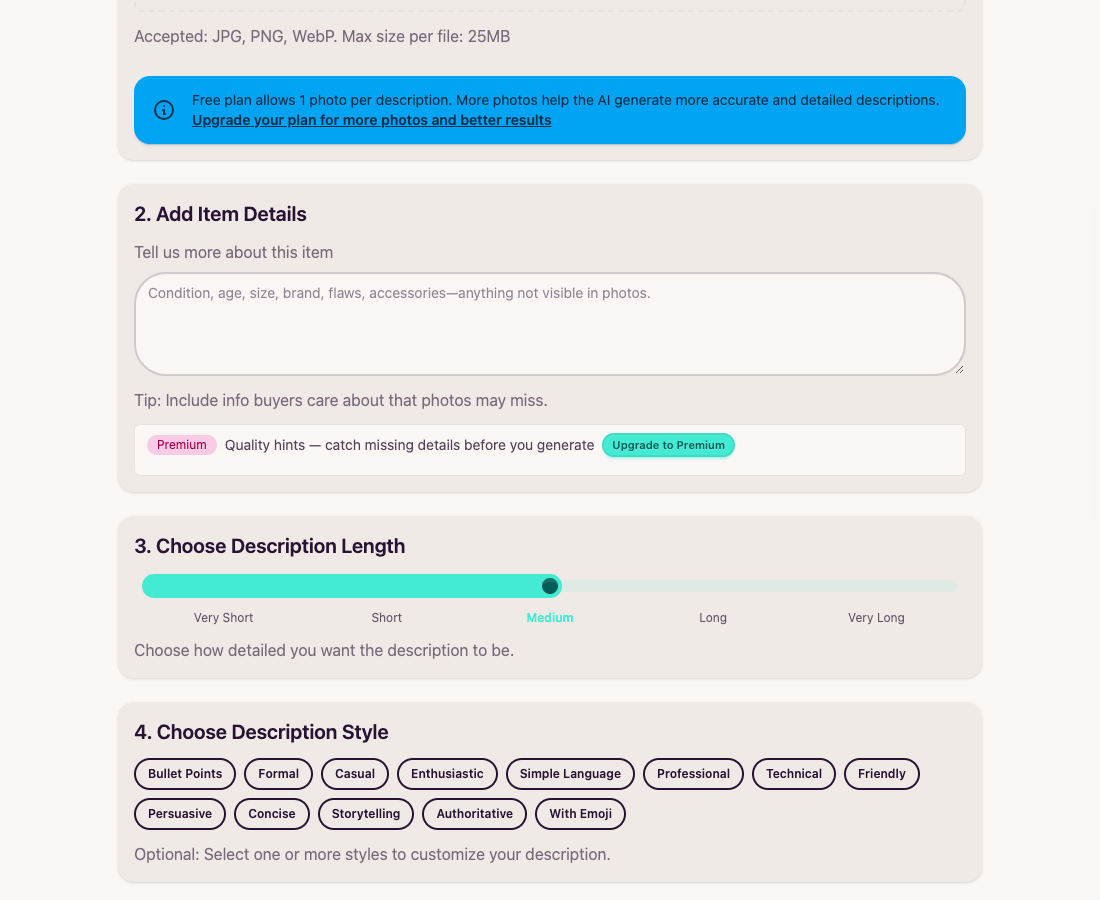
Free plan teaser with Upgrade to Premium CTA
Type Notes — Hints Appear Live
Upload photos and start Item Details as usual. After a short pause, Premium shows chips for issues like:
- Too vague: missing brand, model, or measurable facts
- Missing size / condition / specs: fields buyers expect for that item
- Photo mismatch: notes that don’t match what’s visible in the image
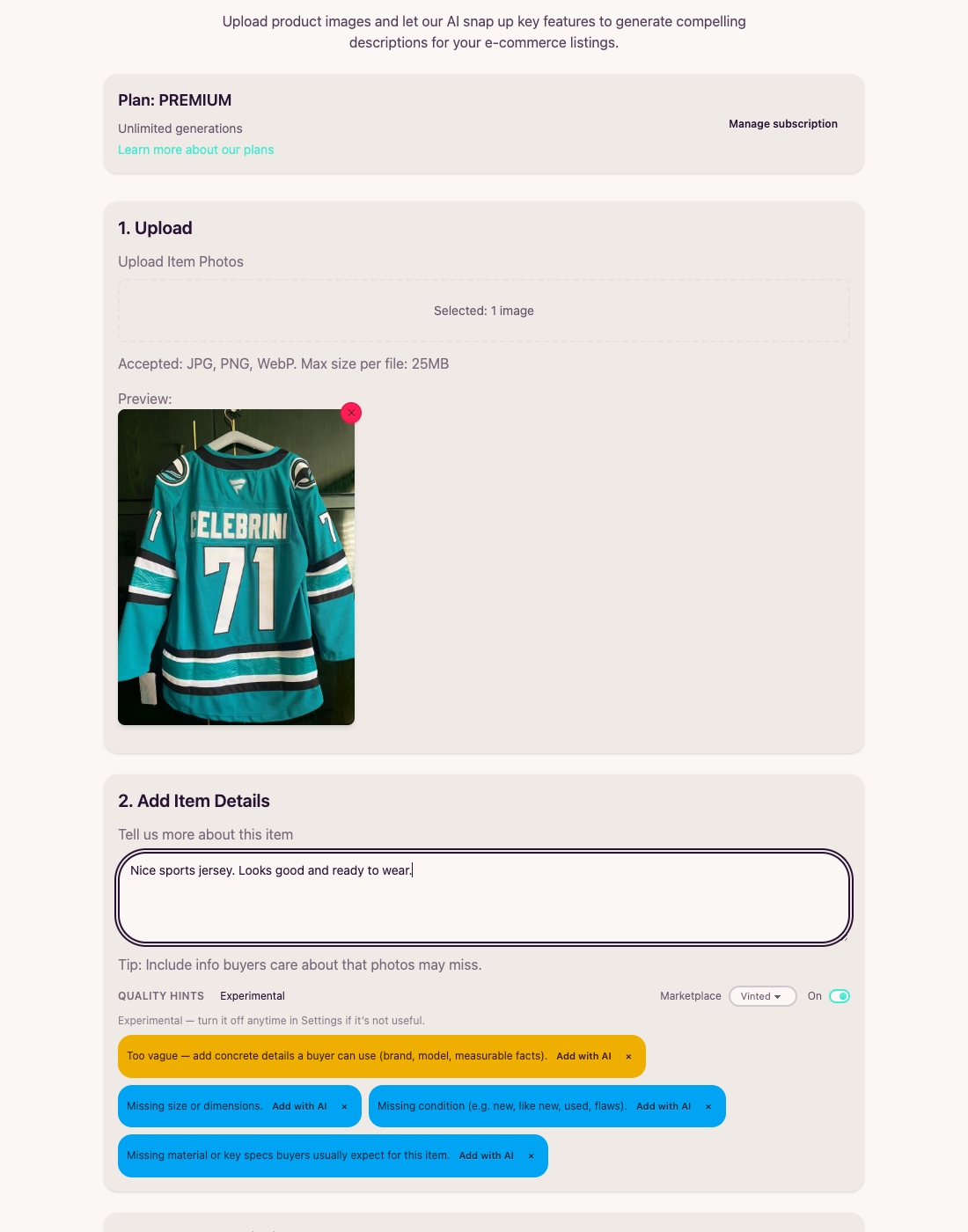
Vague jersey notes trigger size, condition, and clarity tips
Fix Gaps with Add with AI
Each enrichable tip includes Add with AI. One click expands your Item Details with the missing angle—size, condition, brand, or key specs—without leaving the form. Dismiss tips you don’t need.
- Add with AI: Enrich notes from the hint instruction
- Dismiss (×): Hide a tip for this listing
- Photo tips: Some photo mismatch tips are dismiss-only so you can correct notes yourself
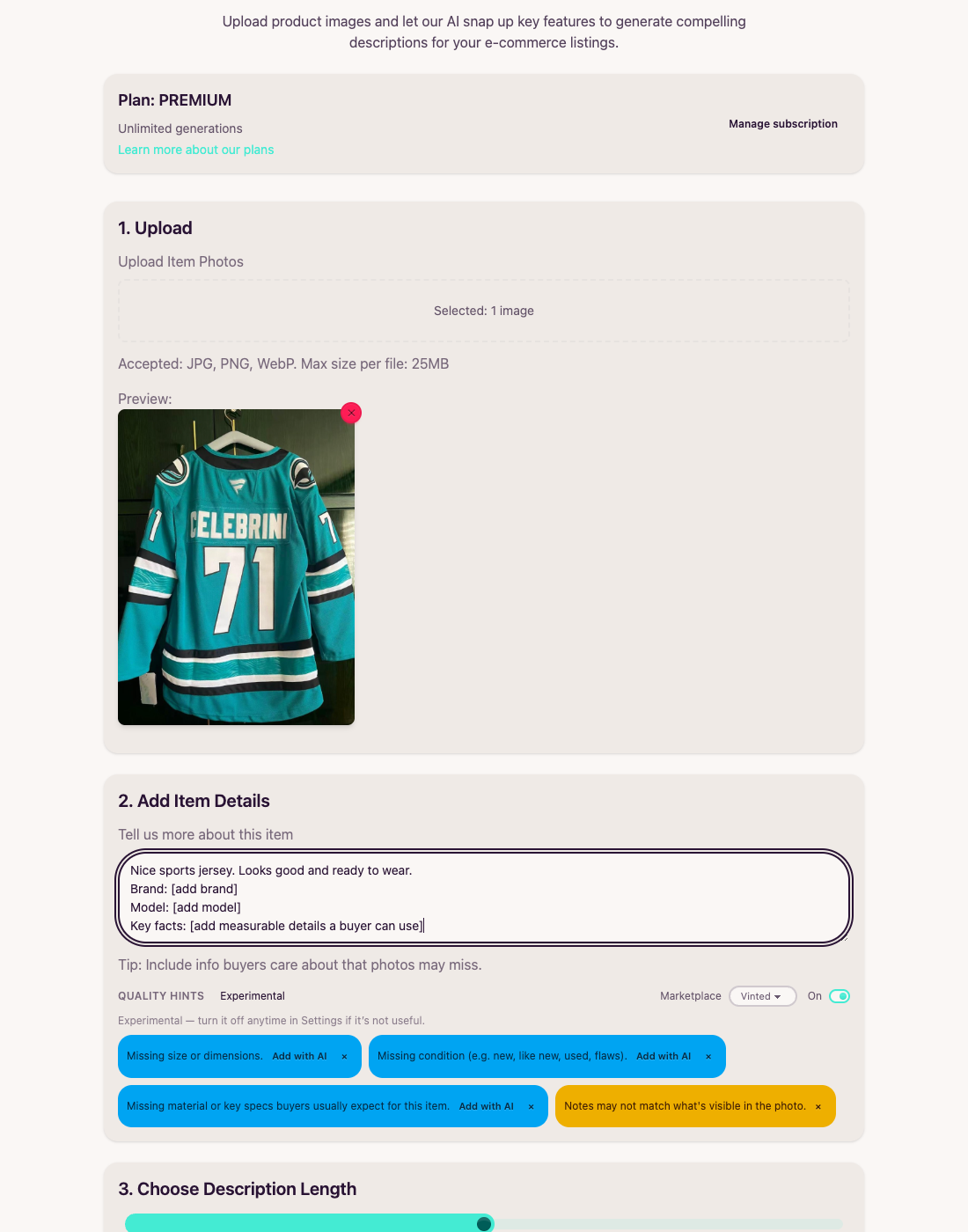
After Add with AI — notes expand; remaining tips stay actionable
When Notes Look Good — Generate
Once size, condition, brand, and other buyer facts are in place, hints clear to “Looking good — no issues flagged.” Then choose length and style and generate as usual—with stronger seller notes behind the AI description.
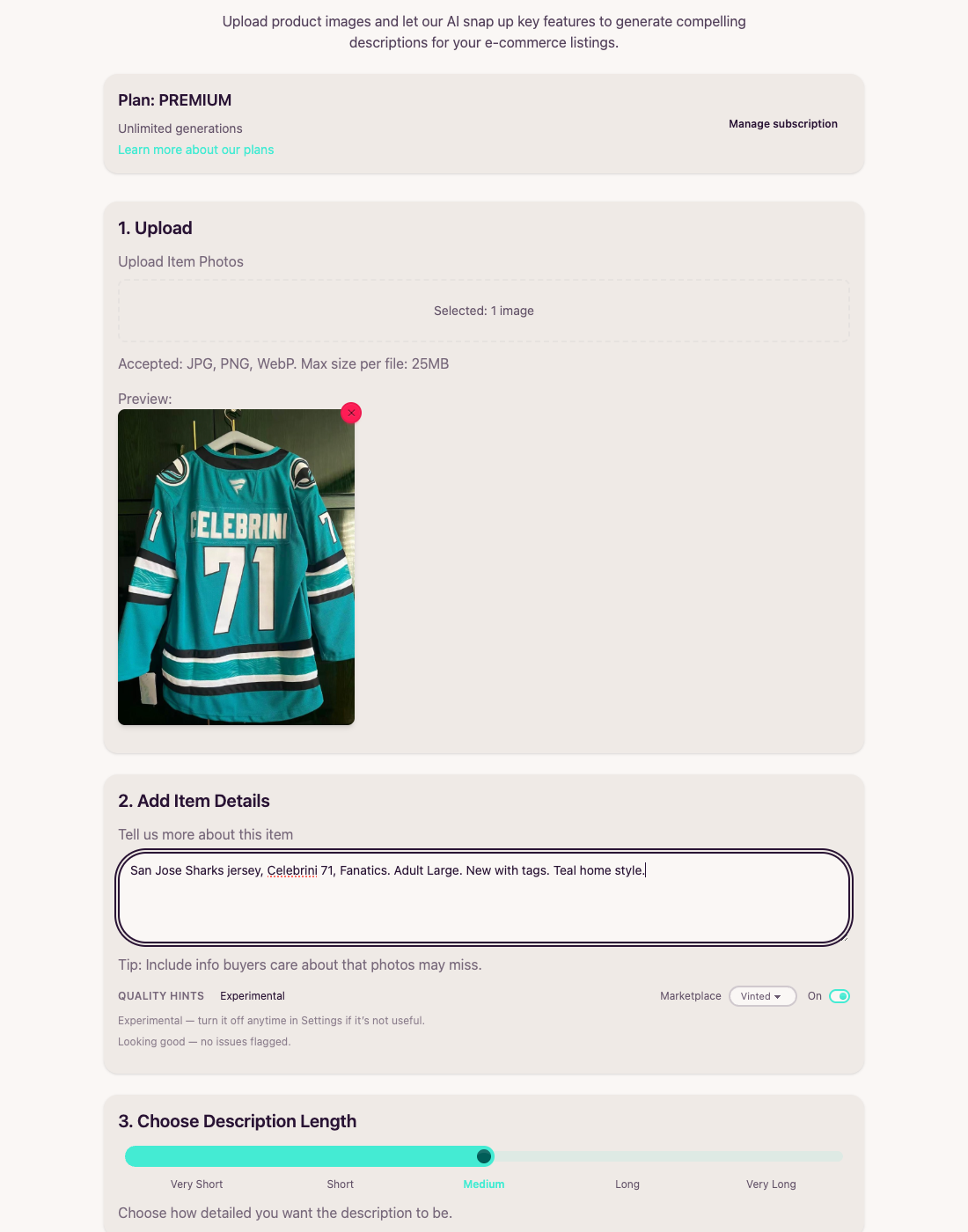
Complete notes → no issues flagged → ready to generate
Turn Hints Off Anytime
Quality Hints is experimental. Prefer a quieter form? Use the On toggle next to the hints panel, or open Settings → Quality hints and disable it. Preference is stored in this browser only.
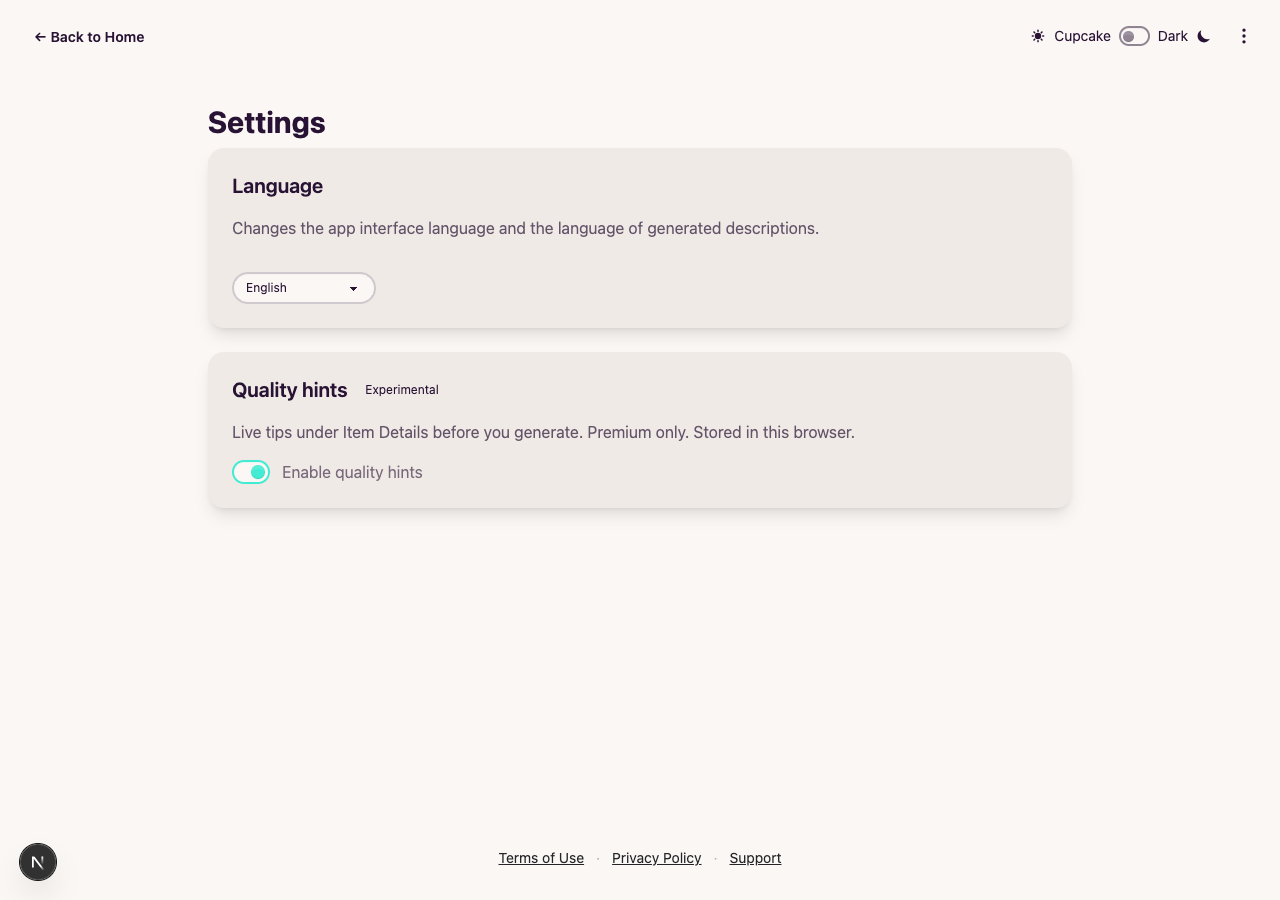
Settings toggle for Premium quality hints
"Before and After" Examples
See how live hints turn thin seller notes into buyer-ready details before you generate.
Example 1: Sports Jersey Listing
❌ Before (vague notes):
"Nice sports jersey. Looks good and ready to wear."
Hints: too vague · missing size · missing condition · missing specs
✅ After (hints cleared):
"San Jose Sharks jersey, Celebrini 71, Fanatics. Adult Large. New with tags. Teal home style."
Looking good — no issues flagged.
Example 2: Add with AI in One Tap
❌ Before (missing buyer facts):
You know the item is “new with tags” and Adult L—but those facts never made it into Item Details, so the AI has nothing solid to work from.
✅ After (Add with AI + quick edits):
Tap a hint chip, let AI draft the missing size or condition line, then tweak the wording. Generate once with complete notes instead of regenerating three times.
Perfect For Different Use Cases
Switch marketplace targets so tips match how buyers shop on each platform.
Fashion & Resale
Size, condition, and brand matter on Vinted and similar marketplaces. Hints nudge those fields before you publish.
eBay & Amazon
Specs, measurable facts, and condition language differ by marketplace—pick the target so tips stay relevant.
Photo-Led Listings
When notes disagree with the photo, Premium can flag a mismatch so you fix the story before buyers notice.
Frequently Asked Questions (FAQ)
Answers to common questions about Live Quality Hints.
Under Item Details, after you’ve typed enough seller notes. Hints debounce briefly while you type so the panel stays steady, then show dismissible chips for issues like vague wording, missing size, or condition.
It enriches your current Item Details using the selected hint (for example, missing size or condition). The text area updates in place so you can edit further before generating.
Yes. Use the On toggle next to the hints panel, or go to Settings → Quality hints. Your preference is stored in this browser only.
Live Quality Hints is a Premium feature. Free and Standard users see a teaser with an upgrade CTA; the hints API is not called until you have Premium access.
We’re iterating on tip accuracy and marketplace coverage. You can dismiss tips individually or disable the feature entirely if it isn’t helpful for your workflow.
Quality hints run on your pre-generate Item Details—the seller notes you provide—not on the finished generated description. Fix notes first, then generate.
Ready to Catch Gaps Before You Generate?
Join Premium sellers who tighten Item Details with live tips—then generate listings that already have the facts buyers care about.
Try Quality Hints for FreePremium feature · Experimental · No commitment · Instant access